Choosing the best automatic chicken coop door depends on more than its opening and closing mechanism. Power source, pop hole dimensions, mounting requirements, and control options all affect how well a door works with your coop.
We have purchased, installed, used, and tested automatic and solar chicken coop doors for our own flock at Carter Farm.
Our experience has shown us the importance of checking battery capacity, solar panel placement, opening size, and manual operation before choosing a model.
In this comparison, we review automatic chicken coop doors based on their published features, power options, operating controls, and suitability for different coops.
We distinguish our firsthand product experience from manufacturer specifications and have not personally tested every model listed.
You will also find a practical checklist for measuring your coop opening, choosing a reliable power setup, and planning a manual fallback if the door stops working.
7 Automatic Chicken Coop Doors We’ve Used, Tested, and Researched
Note: Door measurements are usable opening dimensions only where the listing provides them. Overall product dimensions are not a substitute for entrance size.
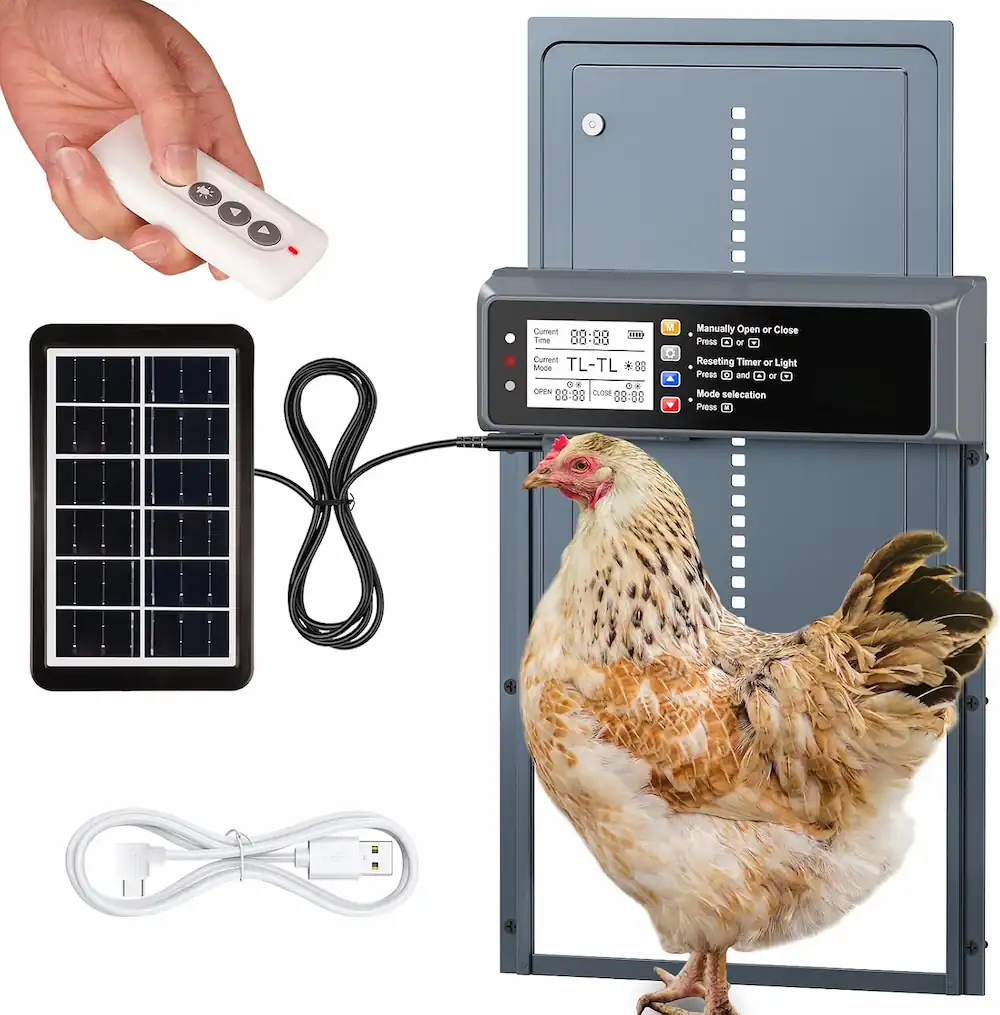
1. Automatic Chicken Coop Door Solar Powered with Timer & Light Sensor
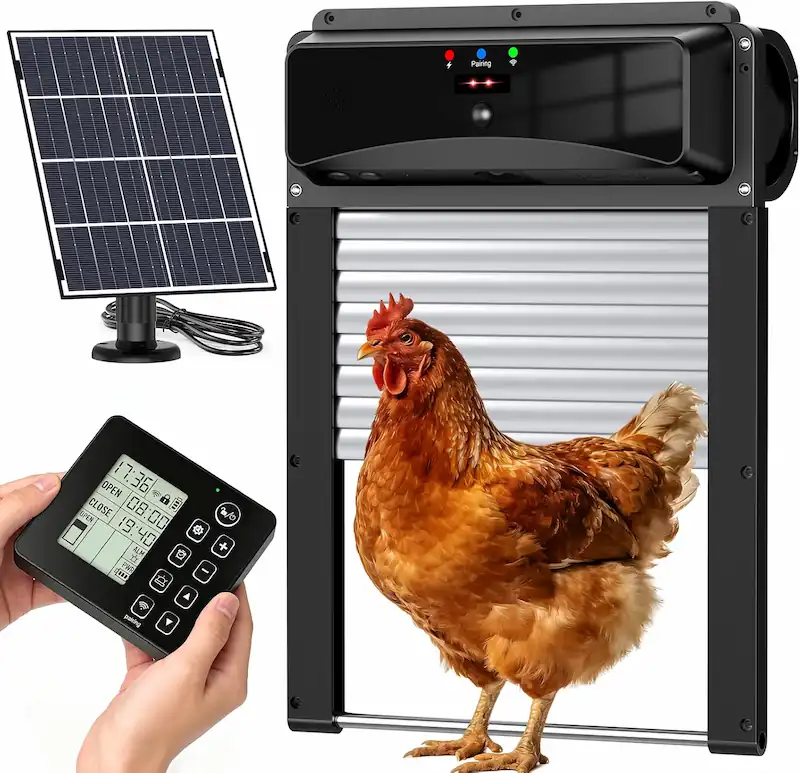
This solar-powered automatic chicken coop door is one of the options we’ve used with our chickens at Carter Farm. It combines a built-in rechargeable battery, solar charging, a backup charging cable, and two automatic operating modes.
You can set it to follow a timer or respond to natural daylight, depending on how you manage your flock.
Key feature
Details
Door opening
8.2 inches wide × 9.6 inches high
Power source
Solar panel and rechargeable battery
Backup charging
Included charging cable
Operating modes
Timer, light sensor, manual and remote control
Display
LCD screen
Safety feature
Anti-pinch protection with reverse movement
Construction
Aluminum alloy and ABS
Remote control
Included
Installation
Screws included
Suitable poultry
Chickens and smaller poultry; opening is not suitable for turkeys
Our Experience Using This Solar Chicken Coop Door
What makes this automatic chicken door useful is the choice between timer and light-sensor operation.
We can set specific opening and closing times instead of relying entirely on daylight. That’s particularly helpful as the seasons change and our chickens’ outdoor routine shifts.
The LCD display is another feature you’ll appreciate. It shows the programmed settings, so adjusting the opening and closing schedule doesn’t involve guessing which mode is active.
We also have the remote control for manual operation when we want to override the automatic schedule.
One feature worth mentioning is its dual charging setup. The solar panel handles regular charging, while the included cable provides another way to recharge the battery.
Its anti-pinch function is designed to detect resistance while the door closes. When it encounters an obstruction, it reverses for approximately 10 seconds before attempting to close again.
A beep also alerts you if the door doesn’t close completely. We consider this useful, although we still check that all our chickens have entered before the door shuts.
Pros
Solar charging with a cable backup option.
Timer and light-sensor modes provide scheduling flexibility.
LCD display makes settings easier to adjust.
Remote control allows manual operation.
Anti-pinch protection and incomplete-close alert.
Cons
The opening may be small for larger chicken breeds.
Solar charging still depends on panel exposure and weather.
Settings need checking after adjustments.
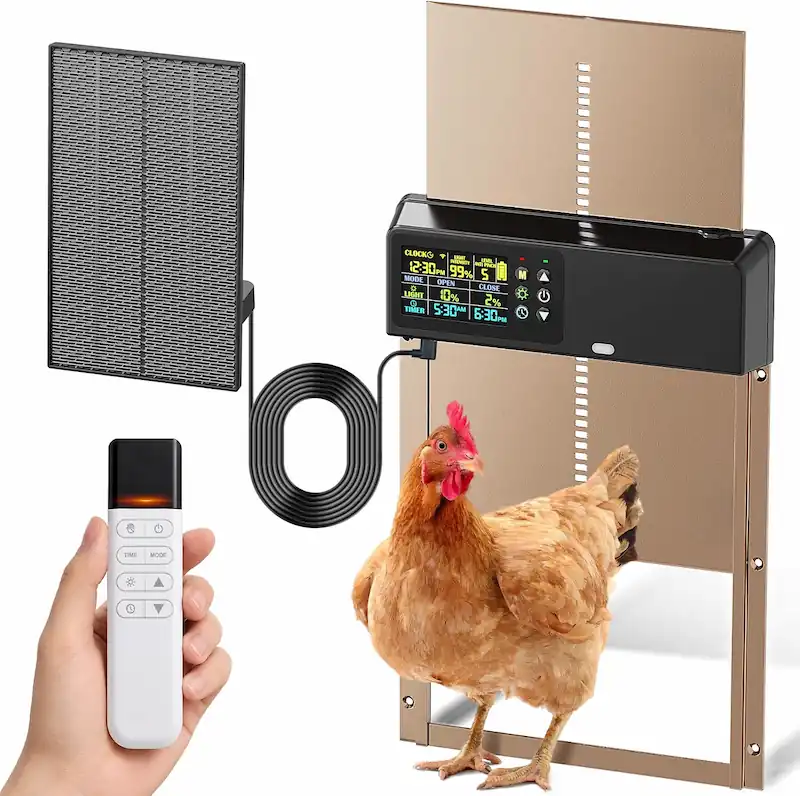
2. Automatic Chicken Coop Door with 3500mAh Solar Power
If you prefer a door with several operating options but don’t need a camera or Wi-Fi connection, this 3500mAh solar-powered automatic chicken coop door is worth considering.
We have also used this type of setup at our farm, where its simple daylight operation is often more useful than having extra technology to manage.
Key feature
Details
Battery capacity
3500mAh
Power source
Solar panel and rechargeable battery
Backup charging
USB-C
Operating modes
Timer, light sensor, remote, manual and mixed
Display
Color LCD
Door construction
Aluminum alloy frame and panel
Safety feature
Anti-pinch sensor with reverse function
Remote control
Long-range remote
Listed operating temperature
-15°F to 140°F
Installation
Designed for wooden coops and suitable netting
Why We Like Having Multiple Operating Modes
The five operating modes give this door a little more flexibility than a basic timer-controlled model.
You can use the light sensor to follow daylight, set a fixed schedule, operate it manually, or use the remote when you want to open or close the entrance yourself.
We tend to favor light-sensor operation for everyday flock routines because sunrise and sunset don’t happen at the same time throughout the year.
Still, a timer is useful when you want more control over the schedule. The mixed mode also gives you another way to combine automatic operation with manual adjustments.
Its color LCD makes switching between settings easier. It’s a useful addition when you’re changing schedules rather than having to work through an unfamiliar control system each time.
Power is another reason this model caught our attention. Its 3500mAh rechargeable battery can be charged through the solar panel or USB-C.
Having USB-C backup is particularly useful in winter. You shouldn’t rely on the solar panel alone if it were mounted in a shaded position or regularly covered by snow.
The aluminum alloy frame and door panel provide a solid physical barrier at the coop entrance. That’s a useful construction feature, but I wouldn’t describe the door as completely predator-proof. A strong door cannot compensate for weak mounting points, gaps around the frame, or an unsecured coop.
Pros
Five operating modes for flexible control.
3500mAh rechargeable battery.
Solar and USB-C charging options.
Color LCD makes programming easier.
Aluminum alloy construction.
Anti-pinch protection.
Cons
Exact opening dimensions need confirmation before ordering.
Remote control may be unnecessary if you mainly use automatic modes.
Solar performance depends on panel placement.
3. CHAMUTY Automatic Chicken Coop Door with Camera & 5000mAh Solar Power
This CHAMUTY automatic chicken coop door takes a different approach. Instead of concentrating mainly on opening and closing the pop hole, it adds a camera, night vision, motion alerts, and app access.
The extra visibility provided by the camera has proven very useful when we’re away from the chicken coop.
Key feature
Details
Brand
CHAMUTY
Battery capacity
5000mAh
Solar panel
7W
Backup charging
USB charging
Camera
1080P HD
Night vision
Yes
App control
iWFCam app
Motion detection
PIR motion alerts
Operating mode
Custom timer and app control
Door design
Automatic roll-up
Safety feature
Anti-pinch protection
Waterproof rating
IP65
Materials
ABS and aluminum
Additional features
Alarm, remote control and shared app access
Camera Monitoring Makes This Door Different
The biggest reason to consider this model is its built-in 1080P camera. With a regular automatic door, you mainly rely on the programmed schedule and hope everything is going as planned. This model gives you another way to check the coop through the iWFCam app.
You can view live footage, use night vision in low-light conditions, and receive motion notifications through the app. It also includes an alarm function that can be activated through the available controls.
Its power setup is another advantage. The 5000mAh battery works with an upgraded 7W solar panel, and USB charging provides an alternative when sunlight isn’t enough.
Compared with the two previous options, this model offers a higher stated battery capacity and a more powerful listed solar panel.
You should pay particular attention to panel placement if installing it in a shaded area or somewhere that receives limited winter sunlight.
The roll-up door is also different from the sliding or lifting arrangements found on many conventional automatic coop doors.
It takes up less space around the entrance, which can be useful when the coop layout doesn’t leave much room for a swinging door.
Another feature we appreciate is shared app access. If more than one person looks after the flock, sharing access can make it easier to check the camera and manage the door without passing around a single phone.
The IP65 rating is also useful for an outdoor installation, but the camera, charging connections, and mounting points still need to be installed according to the manufacturer’s instructions.
Pros
1080P camera with night vision.
5000mAh rechargeable battery and 7W solar panel.
USB charging backup.
App access and motion notifications.
Alarm and remote-control functions.
Space-saving roll-up door design.
Shared access for family members.
Cons
Camera and Wi-Fi features add to power requirements.
Camera angle may not show chickens immediately beneath the door.
More features mean more settings to configure.
4. MASTERFUN WiFi Automatic Solar Chicken Coop Door
If you want to check your chickens without walking out to the coop every time, this MASTERFUN model combines an automatic roll-up door with a camera, Wi-Fi app control, and motion alerts.
It’s similar in concept to the CHAMUTY camera-equipped door above, but offers a few additional monitoring features, including two-way audio and a direct power connection.
Key feature
Details
Brand
MASTERFUN
Battery
5000mAh
Power options
Solar, rechargeable battery and direct power
App control
Yes, 2.4GHz Wi-Fi
Camera
Live video monitoring
Audio
Two-way audio
Operating modes
App scheduling and manual control
Remote control
Included, up to 15m
Safety
Anti-pinch protection
Additional features
Motion alerts, alarm, photo and video recording
Door design
Space-saving roll-up
Material
ABS
What Stands Out About This Model?
The camera and app controls are the main attractions here. You can check the coop, view door status, and open or close the entrance using your phone, even when you’re away from home.
Two-way audio, photo capture, and video recording add a few useful extras for monitoring flock activity.
We particularly like the idea of shared app access for households where more than one person looks after the chickens. Your partner can check the camera or manage the door without needing to use your phone.
Power flexibility is another plus. Its 5000mAh battery works with solar charging, and the product also supports direct power connection.
One thing to check before ordering is the Wi-Fi requirement. This model needs a 2.4GHz network for app connectivity, so it isn’t the best fit if your coop is outside your network’s reliable range.
The handheld remote offers another way to operate the door nearby, with a listed range of 15 meters.
Pros
Live camera view and two-way audio.
App control from Wi-Fi or mobile data.
5000mAh battery with solar and direct power options.
Motion notifications and alarm.
Shared access for family members.
Cons
Requires a compatible 2.4GHz Wi-Fi connection for app features.
Camera and connectivity add to power consumption.
Remote range is limited to 15 meters.
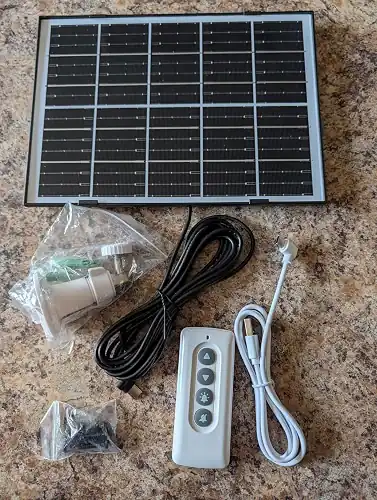
5. Sun Energise Large Solar Automatic Chicken Coop Door
Not every chicken keeper needs a camera, Wi-Fi, or motion notifications. Sometimes a larger entrance, simple controls, and a dependable power arrangement are enough.
That’s where this Sun Energise solar automatic chicken coop door comes into the picture.
Key feature
Details
Brand
Sun Energise
Overall dimensions
11.5 × 3 × 13.5 inches
Power source
Solar and rechargeable battery
Backup charging
USB cable
Operating modes
Timer, light control, manual and remote
Display
Large LCD screen
Remote range
Up to 165 ft (50m), unobstructed
Door material
Aluminum alloy
Safety
Anti-pinch protection
Listed operating temperature
-15°F to 140°F
Additional feature
Larger opening than standard models, according to listing
A Roomier Entrance and Straightforward Controls
The first thing you’d look at with this model is its larger entrance. If you keep heavier chicken breeds, opening size deserves attention.
A narrow pop hole can make daily movement awkward, especially when several birds try to enter or leave together.
Sun Energise advertises an opening approximately 20% larger than competing models. However, the listing doesn’t give an exact usable opening measurement, so you should confirm the dimensions with the seller before replacing an existing coop door.
Its controls are refreshingly simple and easy. You get four operating modes: timer, light control, manual, and remote.
The large LCD screen displays the settings, making it easier to check the programmed schedule without working through complicated menus.
The remote has a listed range of up to 165 feet when there are no obstacles between the remote and the door. That’s handy if you want to operate the entrance from the house or another nearby area.
Solar charging handles the regular power supply, while the USB cable gives you another charging option.
The aluminum alloy door is designed for outdoor conditions, with a stated operating temperature range of -15°F to 140°F. Its anti-pinch mechanism also reverses the door when it encounters an obstruction before attempting to close again.
Pros
Advertised larger entrance for bigger chickens.
Four operating modes.
Large, easy-to-read LCD screen.
Solar charging with USB backup.
Long-range remote control.
Aluminum alloy door construction.
Cons
Exact opening dimensions aren’t provided in the listing.
Actual remote range depends on obstacles.
Battery-life claims should be confirmed with the manufacturer.
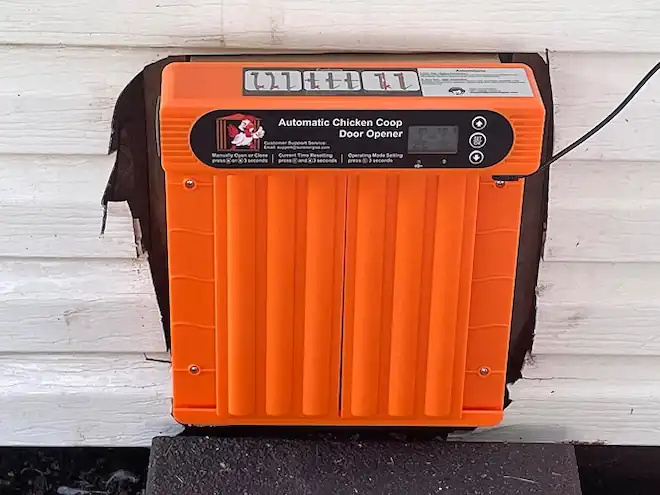
Here’s another MASTERFUN model, but this one takes a different route from the Wi-Fi camera door above.
Instead of relying on a phone app, it comes with a separate LCD remote controller, a 120-degree motion sensor, and a roll-up door. No Wi-Fi connection is needed.
Key feature
Details
Brand
MASTERFUN
Battery
5000mAh detachable battery
Power options
Solar, USB and direct battery charging
Door opening
9.4 inches high × 7.9 inches wide
Overall dimensions
13.4 × 9.4 × 4.52 inches
Remote range
Up to 600 ft (listed)
Remote display
LCD with door and battery status
Door design
Space-saving roll-up
Motion sensor
120-degree detection
Safety
Anti-pinch with automatic reversal
Waterproof rating
IP65
Listed operating temperature
5°F to 140°F
Additional feature
Predator deterrent alarm
No Wi-Fi Needed, Just the Remote and Solar Charging
The separate LCD controller is what makes this model interesting. It displays whether the door is open, closed, or showing an error, along with the battery levels for the door and remote.
You can check its status without opening an app or connecting the coop to your home Wi-Fi.
The advertised 600-foot remote range is another standout feature. That’s a generous distance for a backyard setup, although walls, trees, and other obstacles can affect the actual signal.
We also like the combination of solar charging and a detachable 5000mAh battery. USB charging provides another option when sunlight isn’t doing enough, and the listing also mentions direct battery charging.
Now, the motion sensor is worth a closer look. Its 120-degree detection area is designed to identify approaching movement and activate a deterrent alarm.
The indoor controller can also sound an alert. This gives you another way to notice nighttime activity around the coop.
For the door itself, the roll-up design saves space around the entrance. Its usable opening measures 7.9 inches wide and 9.4 inches high, so measure your existing pop hole before buying.
The anti-pinch system reverses the door and waits 10 seconds when it detects an obstruction, with up to four attempts before triggering an alarm if the obstruction remains.
Pros
Long-range LCD remote without Wi-Fi.
5000mAh detachable battery.
Solar, USB and direct battery charging options.
120-degree motion detection and alarm.
Anti-pinch protection with repeated reversal attempts.
Space-saving roll-up design.
Cons
Opening may be narrow for larger breeds.
Remote range can decrease with obstacles.
Listed minimum operating temperature is 5°F.
7. GROPOW Extra Large Solar Automatic Chicken Coop Door with Remote Control
If you need a larger automatic door for your flock, GROPOW is worth a look. Its overall dimensions are 13.8 × 10 × 16.9 inches, although check the actual entrance measurements before ordering, as the listing gives the product dimensions rather than the clear opening size.
You can schedule opening and closing with the timer or let the light sensor respond to daylight. The remote adds another way to operate the door without going to the coop.
Power comes from a solar panel and rechargeable battery, with USB charging available when sunlight isn’t enough.
GROPOW also advertises a battery lifespan of up to five years. Treat that as a product claim rather than a guaranteed replacement interval; actual battery life depends on use, charging conditions and battery care.
Pros
Larger overall design than many compact coop door openers
Solar charging with USB backup
Timer, light sensor and remote controls
Large LCD display
Anti-pinch design
Cons
Exact doorway opening dimensions aren’t provided
Solar charging depends on panel exposure and weather
Five-year battery lifespan is an advertised claim
How Automatic Chicken Coop Doors Work, and What They Cannot Do
An automatic chicken coop door has three main parts: a power source, a controller, and a moving door.
The power source runs the motor, the controller decides when it should operate, and the motor moves the door to open or close the pop hole.
The Controller, Power Source, and Moving Door
These three parts do different jobs, so it’s worth looking at them separately when comparing models.
Power source: Batteries, solar-charged batteries, or a plug-in supply provide electricity to the motor and controller. Some models offer more than one charging option.
Controller: A timer, light sensor, or app tells the door when to open and close. A timer follows the schedule you set, while a light sensor responds to changing daylight.
Moving door: The motor drives the door along its track, slides it across the opening, or operates a roll-up mechanism, depending on the design.
Manual controls are a separate consideration. A button, remote, or app may let you open or close the door yourself, even when its automatic schedule is enabled.
If you keep Easter Eggers, give them time to get used to the door opening and closing before relying on its automatic schedule.
Let them walk through the opening while the door is fully open, then supervise a few operating cycles so you can see how they respond.
Automation Is Not Predator-Proofing
Closing the pop hole at night removes one common entry point, but it doesn’t make the whole coop predator-proof.
A raccoon or other predator may still get through a weak latch, an unsecured window, a gap in the wall, or an exposed run.
Also, don’t treat an anti-pinch label as a guarantee that a door will safely handle every situation. Sensors and reversing mechanisms vary between models, and an obstruction may not always be detected as expected.
Before relying on a new automatic door, check that every chicken is inside and that the door has closed fully. Look over the surrounding coop and run for loose hardware, gaps, and damaged wire as well.
Solar, Battery, and Control Options: Choose for Your Coop, Not the Feature List
A solar panel, a large battery, and app control may look impressive on a product page.
What matters is whether the door gets enough power at your coop, suits your daily routine, and remains usable if something stops working.
Solar Power in Shade and Winter
Solar performance depends on panel placement, direct sunlight, and seasonal daylight. Even in Texas, a panel mounted under a roof overhang or beside a shaded wall may not receive enough sunlight to keep the battery charged consistently.
At our Carter Farm in Texas, we consider where the solar panel will be mounted before choosing a solar-powered coop door.
A panel that receives enough direct sunlight is more useful than one fitted in a shaded spot, and USB or cable charging provides another option when sunlight is limited.
A good mounting position makes a difference, and having another way to charge the battery is useful when sunlight is limited.
All seven products in our comparison include solar charging, but their backup options differ:
Product 1: Built-in rechargeable battery and charging cable.
Product 2: 3500mAh battery with USB-C charging.
Product 3, CHAMUTY: 5000mAh battery, 7W solar panel, and USB backup.
Product 4, MASTERFUN WiFi: 5000mAh battery, solar charging, and direct power.
Product 5, Sun Energise: Rechargeable battery and USB charging.
Product 6, MASTERFUN 600ft: Detachable 5000mAh battery, USB charging, and direct battery charging.
Product 7, GROPOW: Rechargeable battery and USB charging.
Check how much direct sunlight reaches the panel’s mounting position throughout the day.
If the coop stays shaded, give USB or direct charging and manual operation more importance than the solar feature alone.
Battery Operation and Backup Power
Battery capacity doesn’t tell you exactly how long an automatic door will run. For example, Products 3, 4, and 6 list 5000mAh batteries, while Product 2 has a 3500mAh battery. Actual runtime also depends on how often the door operates and, for camera-equipped models, how much power the camera and WiFi use.
The charging arrangements matter just as much. Product 6 has a detachable battery, which makes it easier to remove for charging. Products 1, 2, 3, 5, and 7 list cable-based backup charging, while Product 4 also offers direct power.
Before installing any model, check these three things:
Where is the battery located, and how do you access it?
Can you operate the door manually if the battery runs flat or the motor jams?
How does the manufacturer recommend charging it if solar power isn’t enough?
It’s worth checking these details before the first day of automatic operation, not when the door stops responding.
Timer, Light Sensor, Remote, and App Control
The control system determines when the door opens and closes. Some keepers prefer a fixed schedule, while others want the door to follow natural daylight.
Control
How it works
What to consider
Timer
Opens and closes at set times
Adjust the schedule as daylight changes
Light sensor
Responds to natural light
Nearby artificial lighting and sensor placement may affect operation
Remote/manual
Lets you operate the door yourself
Keep the remote or manual control accessible
App/WiFi
Provides remote control and, on some models, notifications or camera access
Check which functions remain available without WiFi
Products 1, 2, 5, and 7 offer combinations of timer, light-sensor, and remote controls. Product 3, the CHAMUTY, adds app control and a camera with night vision and motion alerts.
Product 4, the MASTERFUN WiFi model, adds live camera viewing, two-way audio, and recording. Product 6 stands out with its advertised 600-foot remote range, LCD status display, and motion sensor.
One detail worth checking on app-controlled models is what happens when the internet connection drops.
Remote viewing and notifications may stop, but you should check the product instructions to confirm whether local controls and scheduled operation continue.
Choose a timer if you prefer a fixed opening and closing schedule. A light sensor makes more sense when you want the door to follow natural dawn and dusk.
You should test the settings for several days and make sure nearby lights aren’t triggering unexpected operation.
Measure the Opening and Mounting Space Before You Buy
Measure the Pop Hole and Bird Clearance
Measure the existing pop hole’s width and height, then compare those figures with the automatic door’s actual clear opening. Don’t rely on the product’s overall dimensions.
Don’t rely on the product’s overall dimensions. Leave enough room for your largest chicken, including birds that may hesitate at a narrow entrance.
Our Rhode Island Red chickens at Carter Farm are a good reminder to check the actual entrance size before installing an automatic door. The opening should give your largest birds enough room to pass through without squeezing.
Check the Mounting Surface and Door Travel
Look for uneven boards, slatted siding, trim, narrow corners, and anything that could block the door or controller.
A horizontal door needs side-to-side room, a vertical slider needs clearance along its track, and a roll-up door needs space for its own mechanism.
In Texas, we’ve re-hung sliding doors and mounted panels, so we know a suitable mounting surface matters. If the wall is uneven or slatted, plan for a flat, rigid surface before installation.
Follow the exact model’s manual for mounting and power requirements rather than copying another keeper’s setup.
If you’re still planning or modifying your coop, our chicken coop building guide can also help you think through the layout and mounting space before installation.
Safety, Weather, and Reliability in Daily Use
Run several supervised cycles before relying on the automatic door. Watch for smooth movement, proper alignment, unusual resistance, and how the door responds to an obstruction.
Also make sure your chickens pass through comfortably and have enough time to reach the coop before closing.
We haven’t personally tested every door listed above, so treat this as a practical check for whichever model you choose, not a test result for all seven.
Set the closing time around your flock’s actual roosting routine. Watch for a few evenings and adjust the schedule if any birds are still outside.
Think Through Weather and Debris
Rain, snow, ice, mud, and bedding can affect a door’s track, moving parts, solar panel, or controller.
We usually check the manufacturer’s operating guidance and don’t assume a door is waterproof just because it is advertised for outdoor use.
After storms, inspect the track, mounting points, and latch for debris or movement. Also check whether replacement parts are available and how the door operates if its battery runs low or its connection drops.
For keepers dealing with colder conditions, coop temperature is another part of winter preparation. Our guide to chicken coop heaters covers options for managing cold-weather conditions inside the coop.
Keep a Simple Daily Check
Confirm that the door has opened and closed, the flock is inside, and other coop access points are secure.
App alerts and remote controls are useful only when the required power and connection are available. Check the manual for the exact model’s offline and manual operation.
An automatic door can help with the daily routine, but it doesn’t make a coop predator-proof or guarantee trouble-free operation in every weather condition.
Installation and Maintenance of Automatic Chicken Coop Doors
Follow the instructions for your exact model, secure the mounting surface, and run several complete opening and closing cycles before relying on the door.
At Carter Farm, we’ve mounted panels and re-hung sliding doors as part of our coop work.
You should keep electrical work within your skill level and follow the manufacturer’s instructions rather than attempting wiring repairs without the right qualifications.
When comparing doors, look beyond the feature list. Fit, power backup, controls, safety behavior, weather exposure, replacement parts, and routine maintenance all matter.
If the Door Does Not Move
Work through these checks before assuming the motor has failed:
Check for obstructions: Clear bedding, dirt, leaves, or anything blocking the door.
Inspect alignment: Make sure the door and track haven’t shifted.
Check the power: Look at the battery charge, charging cable, and solar panel position where applicable.
Review the controls: Check the timer, light sensor, remote, or app settings used by your model.
Use the manual fallback: Operate the door manually and consult the manufacturer’s troubleshooting instructions.
Avoid electrical repairs beyond your experience. A simple seasonal log of battery condition, missed cycles, cleaning, and alignment can also help identify recurring problems.
Keep a Backup Plan Within Reach
Know how to open and close the door manually if the power, WiFi, or remote stops working.
Keep the manual-control method accessible, and continue checking that the flock is inside and the coop is secure. Automation helps with the routine, but a quick visual check remains important.
Most chickens learn to use an automatic door with a little guidance. Keep the door open initially and let the flock walk through it during their normal routine. You can encourage hesitant birds with treats, then supervise a few opening and closing cycles until they become familiar with the movement.
Battery life varies by model, battery capacity, door usage, solar exposure, and features such as WiFi and cameras. A 5000mAh battery doesn't automatically last longer in daily use than every smaller-capacity option. Check the manufacturer's runtime information, keep the battery charged, and monitor its condition during regular use.
Yes, if the model has a charged rechargeable battery and can operate independently of mains power. Solar-powered models with battery storage may continue working without household electricity, depending on their design and charge level. WiFi and app features may stop working if the internet or router loses power, even when the door itself continues operating.
Some models can be installed on the inside, but this depends on their mounting design and the manufacturer's instructions. Check the door's travel path, controller access, wiring or charging arrangements, and available clearance. Make sure the installation doesn't interfere with roosts, nesting boxes, or the chickens' movement.
Yes. Artificial lighting near the sensor can affect when the door opens or closes, especially if the light stays on after sunset or switches on before sunrise. Position the sensor away from direct artificial light where possible, and test the door during your normal lighting routine. A timer may be a better choice if nearby lights make sensor operation unpredictable.
David Carter, founder of Farmstead Guide, has over 20 years of hands-on homesteading experience. From raising poultry to practicing sustainable farming, he shares practical tips and insights to help others live a more self-sufficient lifestyle.